
Signals did their perfectly to make synchronous flow reactive, but for a while, Angular didn’t have built-in batteris to handle asynchronous network flow natively. We had to rely on interoperability tools like toSignal and toObservable, but using them meant constantly jumping between two completely different worlds: RxJS Observables and Signals. Angular fixes this friction with httpResource, making the reactivity or async network flows smoother, unified and completely effortless.
In this guide we will build a table using live API data.We will use angular httpResource. Which was introduced to simplify asynchronous data handling using signals. Angular Version 22 marks the httpResource API as stable, making it default choice for simple GET requests.
What we are building with angular httpResource
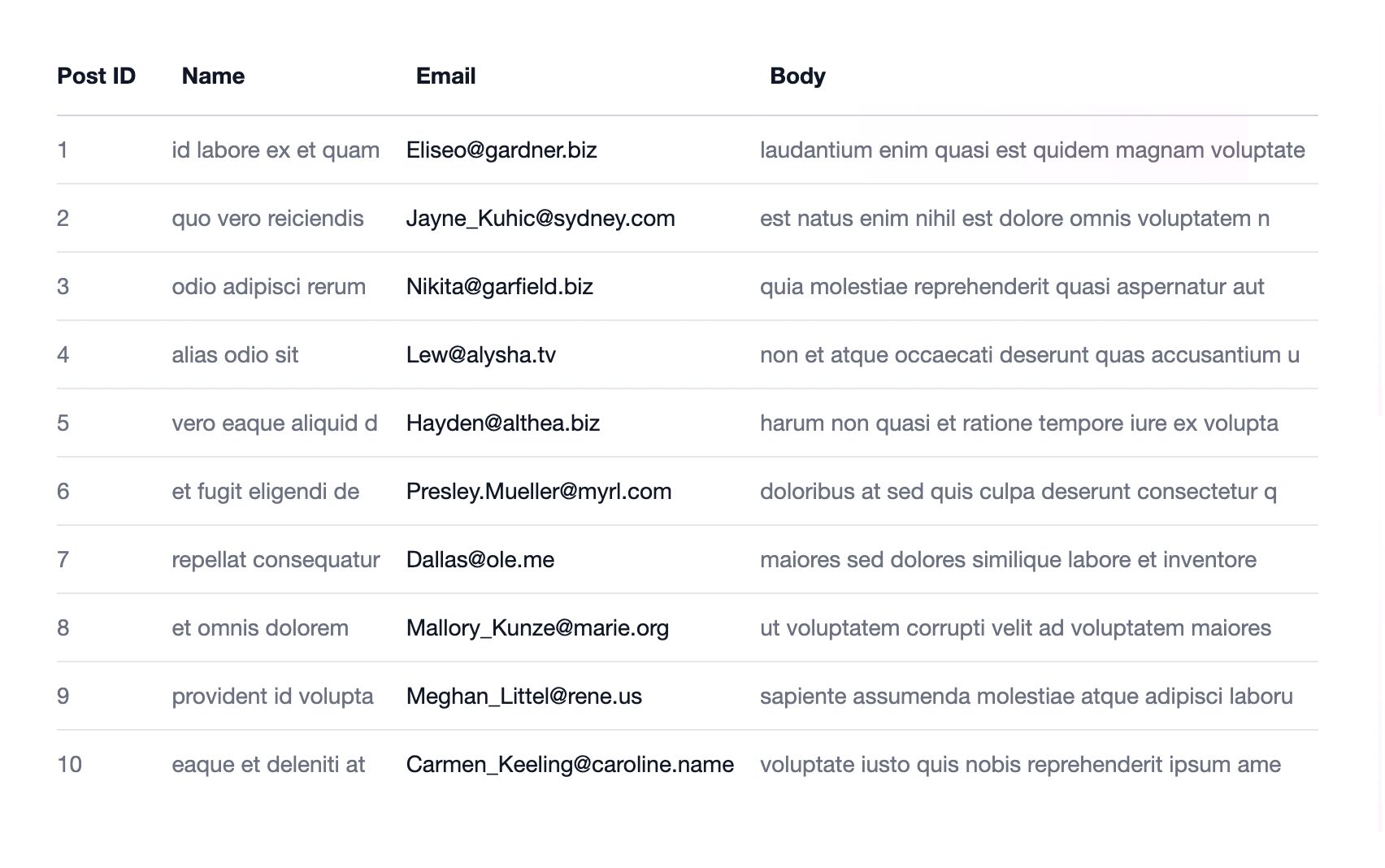
The section shows the final version of our HTML table. The table fetches data from live API (that’s we will cover later) and displays it using angular httpResource.
Video Version
If you prefer a video version then I have created a have gave a bit of intro how Angular evolved from RxJS observables to signals and then to httpResources
Project Setup (minimal)
We need a very basic setup, a new project with default setting will be enough.
ng new --minimal --ssr false --style css --ai-config noneWe use the minimal setup as testing and extra tooling are outside the scope of this guide
The flags of @angular/cli might change base on the version
This prompt will ask for project name (I think we could provide project name as a flag to above click command)
After that, we will have an Angular project with barebones.
Data Source (JSONPlaceholder)
To start with we need some data to display in the table. I will use the JSONPlaceholder a free public API but you can choose any set of data at your convenience. It has comments endpoint which returns the data in following shape
{
  "postId": 1,
  "id": 1,
  "name": "id labore ex et quam laborum",
  "email": "[email protected]",
  "body": "laudantium enim quasi est quidem magnam voluptate ipsam eos\ntempora quo necessitatibus\ndolor quam autem quasi\nreiciendis et nam sapiente accusantium"
}
So by looking at schema we can have following columns (after dropping ID column)
| Post ID | Name | Body | |
| 1 | … | … | …… |
Fetch Data Using Angular httpResource
It’s a wrapper around the same HTTPClient, but returns the signal rather than RxJS observable streams. Those signals can then be combined with other signal friends like computed, linkedSignals etc
comments = httpResource(() => 'https://jsonplaceholder.typicode.com/comments')

#comments = effect(() => {
   console.log(this.comment.value())
})
This is the simplest usage of angular httpResource. We can use value() to get the final result on Line 4. But this will return many hundred comments we need only few of them. We can use params.
For this httpResource provides another overload.
comments = httpResource(() => ({
  url: 'https://jsonplaceholder.typicode.com/comments',
  params: {
    _limit: 10
  }
})
JSONplaceholder accepts _limit params to return a slice of data.
Let’s give it some type safety. By default the value() signal returns undefined. We need to give it some default values such that the template (coming up next) doesn’t complain
//....

type Comment = {
  postId: number;
  id: number;
  name: string;
  email: string;
  body: string;
}

//..
export class Component {
  comments = httpResource<Comment[]>(() => ({
      url: 'https://jsonplaceholder.typicode.com/comments',
      params: {
        _limit: 10
      }
    }), {defaultValue: []},
  );
}
We typed our angular httpResource call with Comment and default value is empty array.
Display Data in an HTML Table
 <table>
   <thead>
     <th>Post ID</th>
     <th>Name</th>
     <th>Email</th>
     <th>Body</th>
  </thead>
  <tbody>

  </tbody>
 </table>
The template is narrowed down to table. We do have wrapper elements and some styles. They aren’t discussing here as they are out of the scope of this guide.
 @for(item of comments.value(); track $index) {
   <tr>
     <td>{{ item.id }}</td>
     <td>{{ item.name | slice: 0: 20 }}</td>
     <td class="normal">{{ item.email }}</td>
     <td>{{ item.body | slice: 0: 50 }}</td>
   </tr>
 }
We are just looping over the comment httpResource value signal. The single is consumed just like any other
We have also used the slice pipe to trim the text otherwise it breaks the layout to many lines (by messing with table layout algorithm)
Handle Loading and Error States
We have some helper signals namely isLoading and error with angular httpRequest. Let’s update our HTML accordingly and see it in action
@if(comments.isLoading()) {
  <tr>
    <td colspan="4">Loading...</td>
  </tr>
}
@if(comments.error()) {
  <tr>
    <td colspan="4">Something went wrong</td>
  </tr>
}
@for(item of comments.value(); track $index) {
//.....
Final Result
Next Steps
In the next part, we added sorting to this table using Angular Signals. You can read that guide here.
Resources & Repo Links
- Link to the Source Code
- Link to Stackblitz Demo
- Link to Youtube Video
- Learn more about Angular httpResource
- Angular Slice Pipe