
We already achieved sorting by updating some signal httpResource. All in unison. But making every column sortable has some boilerplate code. We need a way to easily make our table sortable with minimal effort. In this post we will fix it by building a reusable Angular Sorting Directive, that is inspired from Material Sort without depending on it.
What we are building
To make our sorting logic reusable, We need a way to encapsulate a template that shows active column, sort direction and emitting a sort event.
For template part we need a Component (as Angular directives don’t have templates) and for exchange of event we will need Custom Angular Sorting Directive.
Visually there isn’t much change, most of the efforts happens on Reusability and Developer Experience
How we will build our Angular Sorting Directive
Before we dive deep, let’s outline our approach for this reusable Angular Sorting Directive
- Repurpose template to Sort Header Component
- Add Click handler placeholder to toggle Sort
- Introducing TNBSort
- Registering Sortable Columns
- Adding Sort Logic
- Updating TNBSortHeader template
- Reacting to sortChange event
Architecture Diagram
Before we start implementing let’s see how the pieces fits together
We have three parts
- TNBSort: The parent directives that manages sort
- TNBSortHeader: Child component that attaches to <th>
- App Component: Listens to sortChange event and updates the signal
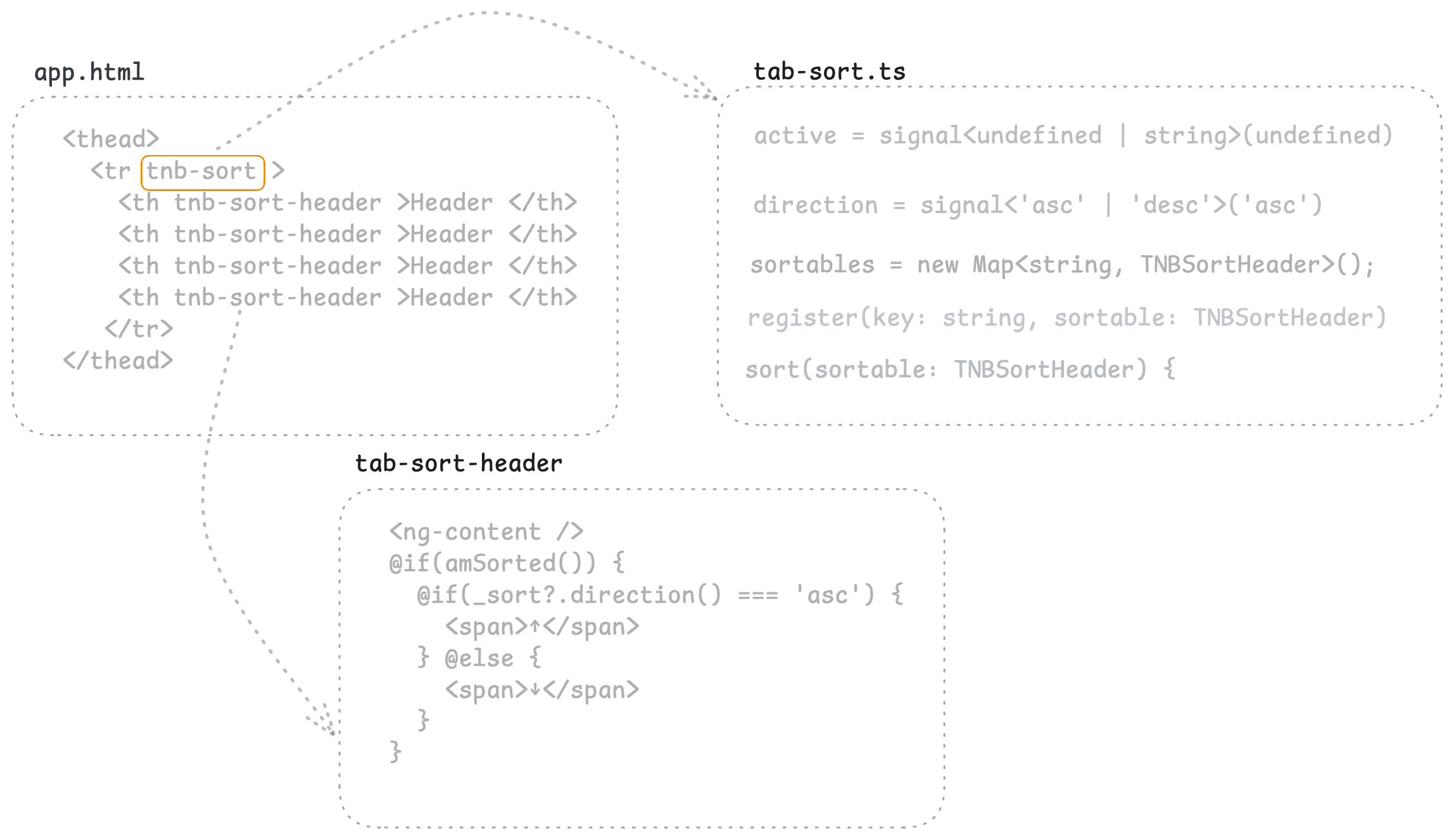
This article allows each header to know,
- whether it’s the active sorted column
- which direction to display
- when to toggle sorting
Repurpose template to Sort Header Component
If we remember that’s how our table header looks like in the previous article codebase
<!------->
<th (click)="sortBy('postId')">
   <span>Post ID</span>
   @if(sort() === 'postId') {
     @if(order() === 'asc') {
       <span>↑</span>
     } @else {
       <span>↓</span>
     }
   }
</th>
<th>Name</th>
<!------->
Let’s give it a new home and call it TNBSortHeader component. We have prefixed it with TNB. Our newly tnb-sort-header.html becomes
<span>Post ID</span>
@if(sort() === 'postId') {
  @if(order() === 'asc') {
    <span>↑</span>
  } @else {
    <span>↓</span>
  }
}
We need to replace first <span> reusable, the th label should come from outside. One way to do is content projection, you can use <ng-content> as placeholder where th label goes.
So our tnb-sort-header.html becomes
<ng-content />
@if(sort() === 'postId') {
<!-- end of file -->
Now we can shrink our app.html with our component selector
<th tnb-sort-header="postId"> Post ID </th>Let’s shape up the TNBSortHeader component with relevant selector and behaviors
@Component({
  selector: '[tnb-sort-header]',
  templateUrl: 'tnb-sort-header.html',
})
export class TNBSortHeader {
  key = input('', {
    alias: 'tnb-sort-header'
  });
}
A quick note on tnb-sort-header=”postId” it does two job.
- Mounts the
TNBSortHeadercomponent on th as we have attribute selector as you can see on line 2 - Assigns a value to the input by the same name
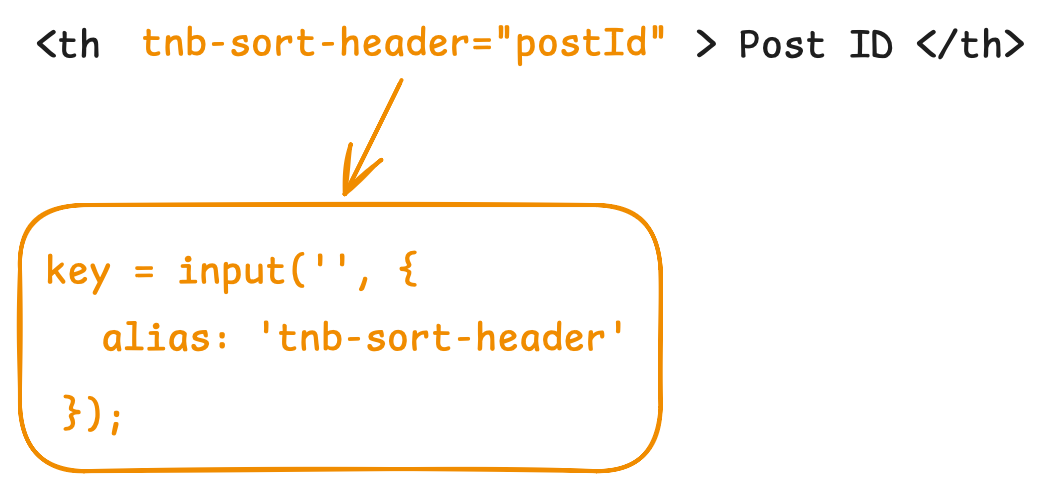
We need this key input at it is very crucial in the future.
Initial Sorting Order
One small feature that gives us extra control when we are sorting any particular column.
export class TNBSortHeader {

  initOrder = input<'asc' | 'desc'>();

}
It specifies what will be the sort order if unsorted column is clicked
Click Handler to toggle Sort
Let’s add some missing properties, such that our component doesn’t complain.
@Component({
  selector: '[tnb-sort-header]',
  templateUrl: 'tnb-sort-header.html',
  host: {
    '(click)': '_toggleSort()',
  }
})
export class TNBSortHeader {

  key = input('', {
    alias: 'tnb-sort-header'
  });

  sort = signal('');
  order = signal('asc');

  _toggleSort() {
    console.log('toggle works', this.key())
  }

}
This missing properties are added on Line 13-14. Since whole th represents TNBSortHeader, click on th means clicking on this component. We can use host attributes to achieve that.
We have to update the input array of app.ts with our newly created component.
Now if we click on th we get,
Now we can add the selector tnb-sort-header to any of our column. We will get the log message with key input we have provided. But where are the sorting indicator and order direction?
Introducing our Angular Sorting Directive
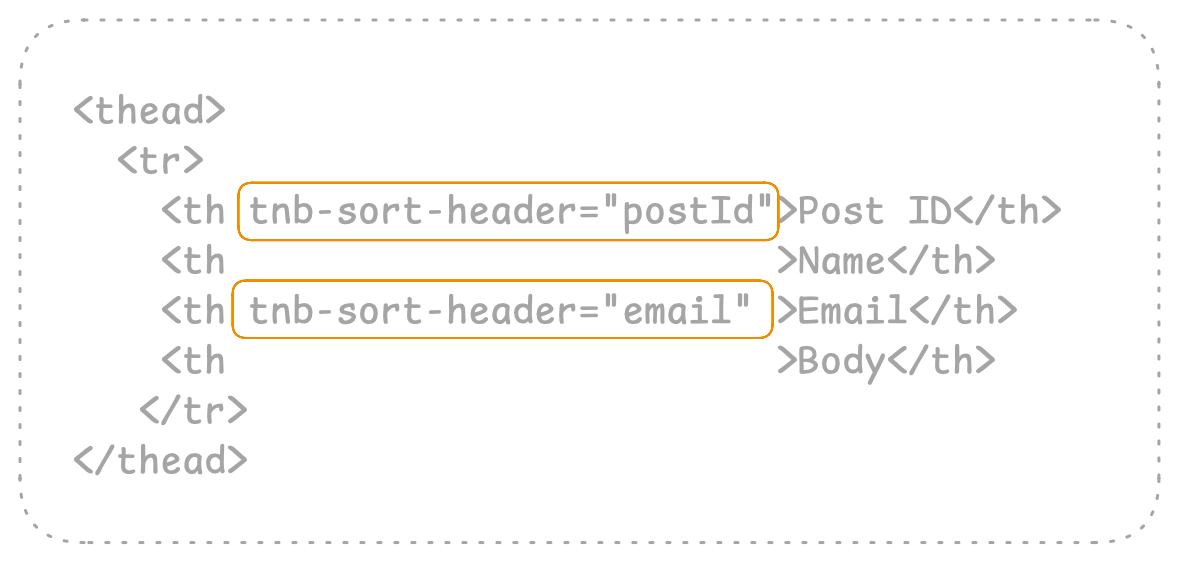
Currently each <th tnb-sort-header> has no idea if another sortable column exists. A column has no way to tell
- If it can be sorted
- If it’s can be sorted whether it’s active or not and which direction to show
We need a way to share some kind of state between them. A database of all the available columns that can be sorted. A way that overarches all the other columns. We need TNBSort our Angular Sorting Directive
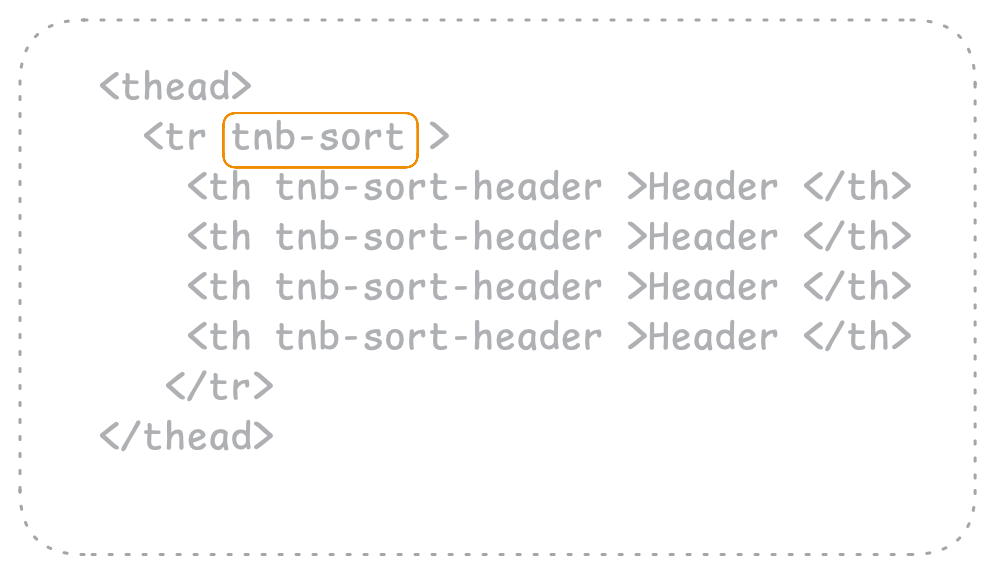
TNBSort will have a map of all the available column. The currently active column, the direction, sorting method.
This directive sits on top in the DOM tree. This placement is intentional, as it allows all the children tnb-sort-header to inject tnb-sort. Thanks to Angular Dependency Injection, at any given time we can access parent properties to decide whether I am currently active sorted column or not.
Thinks will get clear once we start the implementation of our custom directive
Registering Sortable Columns
@Directive({ selector: '[tnb-sort]' })

export class TNBSort {

  sortables = new Map<string, TNBSortHeader>();

}
sortables is a map where key is the key of column and value is Sort Header Column itself. We need a way where a column can register itself.
export class TNBSort {
  //...
  register(key: string, sortable: TNBSortHeader) {

    this.sortables.set(key, sortable);

  }
}
Next we need to call this method from TNBSortHeader component to register itself on init.
export class TNBSortHeader {
  // ...
  _sort = inject(TNBSort, { optional: true})

  ngOnInit() {

    this._sort?.register(this.key(), this)

  }
}
We have injected the Directive with optional flag (we will cover this in error handling section). On initialisation of this column we are registering ourselves to the TNBSort directive which basically means becoming a part of sortables Map.
Adding Sort Logic
We will split this section in to many sub sections.
Currently Active Column
export class TNBSort {

  active = signal<undefined | string>(undefined)

}
This property accepts two types undefined | string. undefined tells that no column is sorted. The table is in it’s original state. Type string holds the key of active column.
We will revisit this property later in this guide.
Order Direction and Sort Change Event
export class TNBSort {

  direction = signal<'asc' | 'desc'>('asc')

  sortChange = output<{ active: string, direction: string }>()

}
direction signal tracks the current sort order, it’s better to keep it in a shared location.
Secondly our TNBSort will emit the sortChange event with current state or sorting. An information that parent table can react upon.
Implementing Sorting Logic
Remember we have added the _toggleSort() method to our TNBSortHeader. Where we had a placeholder log, Let’s change it a bit.
export class TNBSortHeader {
  _toggleSort() {
    this._sort?.sort(this)
  }
}
The naming isn’t perfect but, it keeps the example simple.
Basically we are calling sort (that will be implemented next) and passing current TNBSortHeader instance.
All the above properties of TNBSort will now come into action. Let’s go through them one by one
export class TNBSort {

  sort(sortable: TNBSortHeader) {

    if(this.active() !== sortable.key()) {
      this.active.set(sortable.key())

      const _dir = sortable.initOrder() ?? 'asc'
      this.direction.set(_dir)
    } else { // ....


  }
}
This code deals with two use cases if column is already sorted or not.
If not sorted then set the active signal. The direction signal is self explanatory, initOrder is already explained
sort(sortable: TNBSortHeader) {
  // ...
  } else {
    const nextDir = this.direction() === 'asc' ? 'desc' : 'asc';
    this.direction.set(nextDir)
  }

  this.sortChange.emit({
    active: this.active() as string,
    direction: this.direction() as string
  })
}
If column is sorted then all we have to do is change the direction of the column. At the very end we emit event with appropriate object.
Updating TNBSortHeader template
Current template of TNBSortHeader is broken as it still depends on local properties. @if(sort() === 'postId')
But now this logic is moved to TNBSort. We can achieve that in better way
export class TNBSortHeader {
  _sort = inject(TNBSort, { optional: true})

  amSorted = computed(() => this._sort?.active() === this.key())
}
We can simply replace @if(sort() === 'postId') with @if(asSorted())
Same goes for rest of the template, after making the changes the final template becomes
<ng-content />
@if(amSorted()) {
  @if(_sort?.direction() === 'asc') {
    <span>↑</span>
  } @else {
    <span>↓</span>
  }
}
Now all the pieces are now wired properly apart from sortChange event
Reacting to sortChange event
We need to update the app.html and app.ts respectively to use the newly built angular custom directive
<! --- -->
<thead tnb-sort (sortChange)="updateSort($event)">
  <th tnb-sort-header="postId"> Post ID </th>
  <th>Name</th>
  <! --- -->
</thead>
export class App {
sort = signal('');
order = signal('asc');
updateSort(event: { active: string; direction: string}) {
this.sort.set(event.active);
this.order.set(event.direction);
}
// ...
}Rest of the code is same as our httpResource will react to this signal that are updated in updateSort event handler.
Final Result
With this reusable Angular sorting directive, your table now supports clean, declarative sorting without repeated markup
Resources
- Link to Source code
- Link to Stackblitz demo
- Link to Previous article
- Angular Dependency Injection
- Angular Custom Directive
- Content Projection in Angular
One reply on “Building a Reusable Angular Sorting Directive”
Reusable sorting directives are underrated. Everyone reaches for a full table library first, but a small directive that owns the sort state and the arrow indicators covers ninety percent of real cases without the dependency weight. Clean walkthrough.